mpfserver Manual
 
 
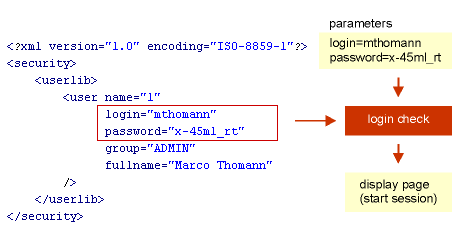
 login | turn on protected mode (access for authentified users only). users listed in XML-database
mpf:xml | importas=login
this is to protect your databases/applications for access by authentified users only (does work only, if session mode is turned on). users must be listed in user-library xml-file
Accessing user information
use the token-structure as shown below to display value of any attribute you defined for user-tag in xml-file. values will be stored in variable "session/user" and are available until client session expires

{mpf:session/user  }
/[myattrib]
id identifier attribute 
login login name 
password password 
group usergroup 
[...] any other defined attribute in user library file (XML) 
||count
use this parameter to count number of items in list (a list/array will not be initialized)
||recs=[number]
this parameter is for use of integrated page partitioning. in combination with "count"-parameter token will return number of pages
||page=[number]
use this parameter to access pages if "recs"-parameter is set to restrict number of records per page
|| convert=[lowercase|uppercase|upperfirst]
convert value string
|| encode=[url|html|html-chars|crypt]
encode value to another format
|| trim=[left|right|both]
remove whitespaces from value
|| convert_section=[lowercase|uppercase|upperfirst]
convert section data (for use with closing token only)
|| parse_section=[yes|no]
parse section data for mpf-tokens (for use with closing token only)
|| encode_section=[url|html|html-chars|crypt]
encode section data to another format (for use with closing token only)
|| trim_section=[left|right|both]
remove whitespaces from section data (for use with closing token only)
|| [opr][condition]
condition may be used to check value
 
 
2004 by master-p-formance.All rights reserved.
 
This manual is generated on the fly using mpfserver and MPFT (mpf transformation).